Release 2.8.0
Release Date: 22-08-2025
Release Notes
We’re excited to announce the release of version 2.8.0!
Overview
This version brings significant improvements across key areas of the platform — including debit card integration, rule engine flexibility, enhanced badge and identity verification, robust wallet and transaction features, as well as security and blockchain enhancements.
These updates aim to deliver better performance, stronger compliance, and a more seamless user experience across the board.
💳 Debit Card Integration (ViaCarte)
-
Allow Customer to Get a Debit Card Using ViaCarte
Customers can request and receive debit cards through the platform. -
Allow Platform Admin to Configure Debit Card Product
Admins can set up debit card products and eligibility rules. -
Performing Transactions Through Debit Card
Debit card transactions are now supported. -
Manage Debit Card – Enhancement
Improved card management, including block/unblock options. -
Debit Card Payments - Card Settlement & Reconciliation Flow
Automated reconciliation and settlement of debit card transactions. -
Rule Engine Changes for Debit Card
Enhanced rule support for debit card processing.
🛠️ Rule Engine & Badge Management
-
Introducing OR Operator in Rule Engine (Badge Management)
Provides more flexibility in rule configurations. -
Enhancement in Badge Management for Identification and Information Badges
Improved rule handling for badge assignment. -
Extension of Badge Management: Support for Adverse Media Fields
Adds support for risk fields from adverse media checks.
🪪 Government ID & Verification
-
Government ID Flag Refinement
Skips duplicate government ID verification when already verified. -
Consistent Validations for Government ID Document DTO
Standardized validations for ID documents across the platform.
💼 Transaction & Wallet Enhancements
-
Enhancement in Transaction History API
Improved tracking and reporting of user transactions. -
Enhancement in Bankbook APIs
Extended support for token transactions. -
Handle Transaction Cancellations for Failed Card Payments
Better handling and status reporting for failed transactions. -
Wallet-Based OAuth 2.0 Login
Secure wallet-based login using OAuth 2.0 protocol.
🔐 Security & Compliance
-
Adverse Media Sanctions Screening (LexisNexis)
Enhanced compliance checks using integrated sanctions screening. -
Pre-auth Token Based Recovery and Onboarding
Secure user recovery and onboarding via pre-authorized tokens.
🖥️ UI/Console Improvements
- Console Enhancement – Table Column Resizing and Order Change
Improved admin console usability with customizable table views.
🔗 Smart Contracts & Blockchain
-
USBC Smart Contracts Changes and Token Reserve Smart Contract Creation
Introduced support for token reservation and smart contract upgrades. -
Client Authorizer Service
New service for securely authorizing client operations.
Upgrade Notes
The sequence of steps to follow to upgrade are:
- Pre-requisites
- DB Configs and migrations
- Token Reserve Smart contract
- USBC Smart Contract Upgrade to Version 15
- Keycloak Configuration for Wallet Auth 2.0
- Container images and configmaps
- Swagger APIs
- Azure Functions
- Post Release Scripts
Pre-requisites
- This release requires the Twilio service for mobile number verification. Please register on Twilio and activate a subscription before proceeding.
- Deploy Token Reserve Smart Contract
- Upgrade USBC Smart contract
- This release requires Viacarte API Keys.
DB configs and migrations
All files are available to be downloaded in Assets area. The following commands should be executed with installed NodeJS version 18 or above.
DB backup
Before proceeding with remaining steps, it's strongly advised to take a database backup before proceeding.
Core Schema DB migrations
Download db_migrations_280.zip file available in Assets, unpack/unzip it in order to perform remaining instructions.
Create/update file in the following path [unzip-folder]/src/common/envs/development.env with credentials contents:
DB_HOST=[replace with db host url]
DB_USER=[replace with db user]
DB_PWD=[replace with db user password]
DB_NAME=[replace with db name]

AZURE_TENANT_ID=[replace with azure tenant id]
AZURE_CLIENT_ID=[replace with azure client id]
AZURE_CLIENT_SECRET=[replace with azure client secret]
AZURE_KEYVAULT_NAME=[replace with azure keyvault name]
Execute migrations:
Settlement Schema DB Migrations
Database variable to change
Before executing Settlement schema migrations the schema itself should be created, where databaseRole should be replaced by your database user/role
CREATE SCHEMA settlement_service AUTHORIZATION databaseRole;

GRANT ALL ON SCHEMA settlement_service TO databaseRole;
Download settelement_service_db_migrations_280.zip file available in Assets, unpack/unzip it in order to perform remaining instructions.
Create/update file in the following path [unzip-folder]/.env with credentials contents:
DB_HOST=[replace with db host url]
DB_USER=[replace with db user]
DB_PWD=[replace with db user password]
DB_NAME=[replace with db name]
DB_SCHEMA=settlement_service
Execute migrations:
Client Authorizer Schema
Database variable to change
Before executing Settlement schema migrations the schema itself should be created, where databaseRole should be replaced by your database user/role
-- DROP SCHEMA client_authorizer;

CREATE SCHEMA client_authorizer AUTHORIZATION databaseRole;

-- DROP SEQUENCE client_authorizer.goose_db_version_id_seq;

CREATE SEQUENCE client_authorizer.goose_db_version_id_seq
INCREMENT BY 1
MINVALUE 1
MAXVALUE 2147483647
START 1
CACHE 1
NO CYCLE;

-- Permissions

ALTER SEQUENCE client_authorizer.goose_db_version_id_seq OWNER TO databaseRole;
GRANT ALL ON SEQUENCE client_authorizer.goose_db_version_id_seq TO databaseRole;

-- client_authorizer.goose_db_version definition

-- Drop table

-- DROP TABLE client_authorizer.goose_db_version;

CREATE TABLE client_authorizer.goose_db_version (
id int4 GENERATED BY DEFAULT AS IDENTITY( INCREMENT BY 1 MINVALUE 1 MAXVALUE 2147483647 START 1 CACHE 1 NO CYCLE) NOT NULL,
version_id int8 NOT NULL,
is_applied bool NOT NULL,
tstamp timestamp DEFAULT now() NOT NULL,
CONSTRAINT goose_db_version_pkey PRIMARY KEY (id)
);

-- Permissions

ALTER TABLE client_authorizer.goose_db_version OWNER TO databaseRole;
GRANT ALL ON TABLE client_authorizer.goose_db_version TO databaseRole;

-- Add goose migration version

INSERT INTO client_authorizer.goose_db_version (version_id,is_applied,tstamp) VALUES
     (0,true,'2025-09-11 09:47:48.168288'),
     (20250714052024,true,'2025-09-11 09:47:48.245031');

-- client_authorizer.transactions definition

-- Drop table

-- DROP TABLE client_authorizer.transactions;

CREATE TABLE client_authorizer.transactions (
public_id uuid NOT NULL,
card_token text NOT NULL,
mti text NOT NULL,
process_code text NOT NULL,
rrn text NOT NULL,
stan text NOT NULL,
terminal_id text NOT NULL,
acquirer_id text NOT NULL,
"timestamp" varchar(255) NULL,
transaction_id text NULL,
auth_code text NULL,
response_code text NULL,
metadata jsonb NULL,
amount float8 NULL,
amount_in_cents varchar(255) NULL,
tenant_id varchar(255) NULL,
partner text NULL,
created_at timestamptz DEFAULT now() NULL,
updated_at timestamptz DEFAULT now() NULL,
CONSTRAINT transactions_pkey PRIMARY KEY (public_id)
);

-- Permissions

ALTER TABLE client_authorizer.transactions OWNER TO databaseRole;
GRANT ALL ON TABLE client_authorizer.transactions TO databaseRole;

-- Permissions

GRANT ALL ON SCHEMA client_authorizer TO databaseRole;
New Tables Introduced in This Migration
The following tables have been added as part of this migration:
Schema: Public
New Tables:
preauth_tokenscustomer_phone_verificationcustomer_tokencustomer_rolessigner_keyscontract_historycard_status_report_logscardscard_statuscard_wallet_mappercard_product_rulescard_product_plansplatform_productsplatform_product_vendorsplatform_product_types
Schema: settelement_service
New Tables:
blockchain_transactionsdisputesfilesknex_migrationsknex_migrations_locksettlement_transactionslogs
Schema: client_authorizer
New Tables:
transactionsgoose_db_version
Token Reserve Smart contract
This service is designed for the deployment of TokenReserve smart contracts to blockchain.
Download UToken Reserve smart contract ZIP file available in Assets, unpack/unzip it in order to perform remaining instructions.
File: token_reserve.zip
⚙️ Environment Setup
Prerequisites
- Postgres: Database must be up and running.
- Blockchain RPC URL: Must be active and accessible.
- Network Config:
NODE_ENVin.envmust be thedevelop. - DB Migrations: Please execute all
db-migrationsbefore deploying the smart contract. - DB Integrity: Deployment checks
contract_storebefore inserting a new record.
Create a .env file in the root of the project with the following variables:
    # SET ENV
    NODE_ENV=develop [Please dont change this value]

    # SET DATABASE creds
    DB_HOST=[replace with db host url]
    DB_USER=[replace with db user]
    DB_PWD=[replace with db user password]
    DB_NAME=[replace with db name]
    DB_SSL=true

    # SET BLOCKCHAIN cred
    RPC_URL=['Replace with RPC URL']

    # SET Token reserve details
    TOKEN_NAME=Token Reserve
    TOKEN_SYMBOL=TOKENRESERVE

    MNEMONIC=['replace with mnemonic']
Important
TOKEN_SYMBOL must remain as TOKENRESERVE. Other services query the DB using this symbol.
Changing it will break dependencies.
MNEMONICS
MNEMONICS are the 12-word recovery seed phrases used to generate wallet key pairs (private/public).
Deployment Steps
Step 1: Contract Compilation
Compile smart contracts:
Node Version: 18+
Step 2: Contract Deployment
Deploy the TokenReserve smart contract:
After the successfull deployment of TOKENRESRVE smart contract you should see the output like this.

The same token proxy address name and symbol and ABI should get stored inside the contract_store (public schema) table as well.

- The script first checks if a contract with symbol
TOKENRESERVEalready exists in thecontract_storetable. - If not, it deploys a new
TokenReserve.solcontract and stores the details in Postgres (contract_storeunder public schema). - ABI, proxy address, name, and symbol are persisted for other services to consume.
🛠️ Commands Summary
| Command | Description |
|---|---|
npm run compile |
Compile smart contracts |
npm run deploy |
Deploy TokenReserve contract |
USBC Smart Contract
USBC Smart Contract Upgrade to Version 15
Download USBC smart contract ZIP file available in Assets, unpack/unzip it in order to perform remaining instructions.
File: usbc_smart_contract_v15.zip
Pre-requisites
We need to deploy TOKEN RESERVE SMART CONTRACT, Before proceeding with USBC Smart contract Upgrade, .
Update credentials
Edit/create a file named .env inside root folder
MNEMONIC='[Replace with Sandbox/Production MNemonic]'
NODE_ENV=['Replace with usbc-sandbox or usbc-production']
APPROVAL_VALUE=90000000000000000000000000
RESERVE_CONTRACT_ADDRESS=" ['replace with Token Reserve Contract Proxy Address'] "
Execute the Smart Contract Upgrade
Execute the remaining commands located inside the extracted content folder (e.g.: usbc-smart-contract):
Keycloak
Keycloak Configuration for Wallet Auth 2.0
- Add new optional parameter to Keycloak realm as walletAddress
- Make email, firstName and lastName at optional field
- Create a group "wallet_users"
Steps to Add new optional parameter to Keycloak realm as walletAddress
- Login to Keycloak and navigate to appropriate realm
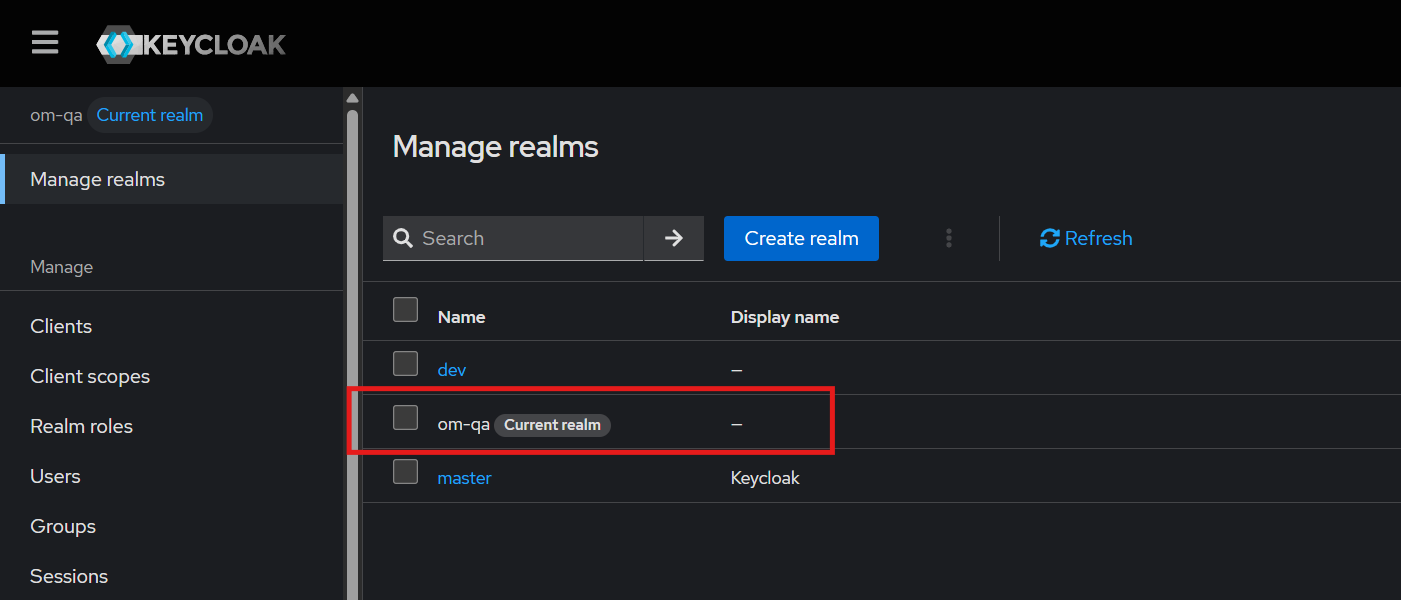
- Navigate to "User profile" under "Realm Settings"
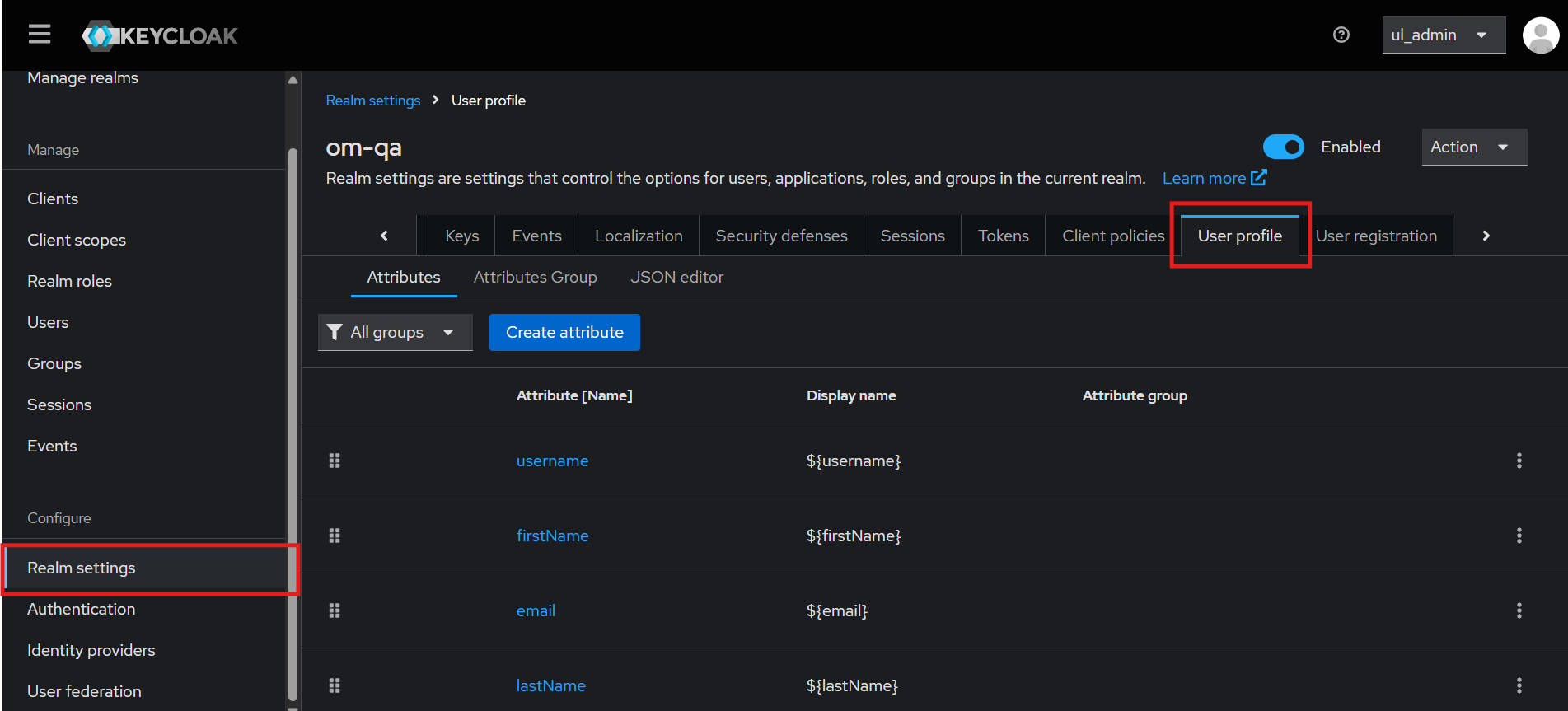
- Click on "Create Attribute" button to create a new attribute
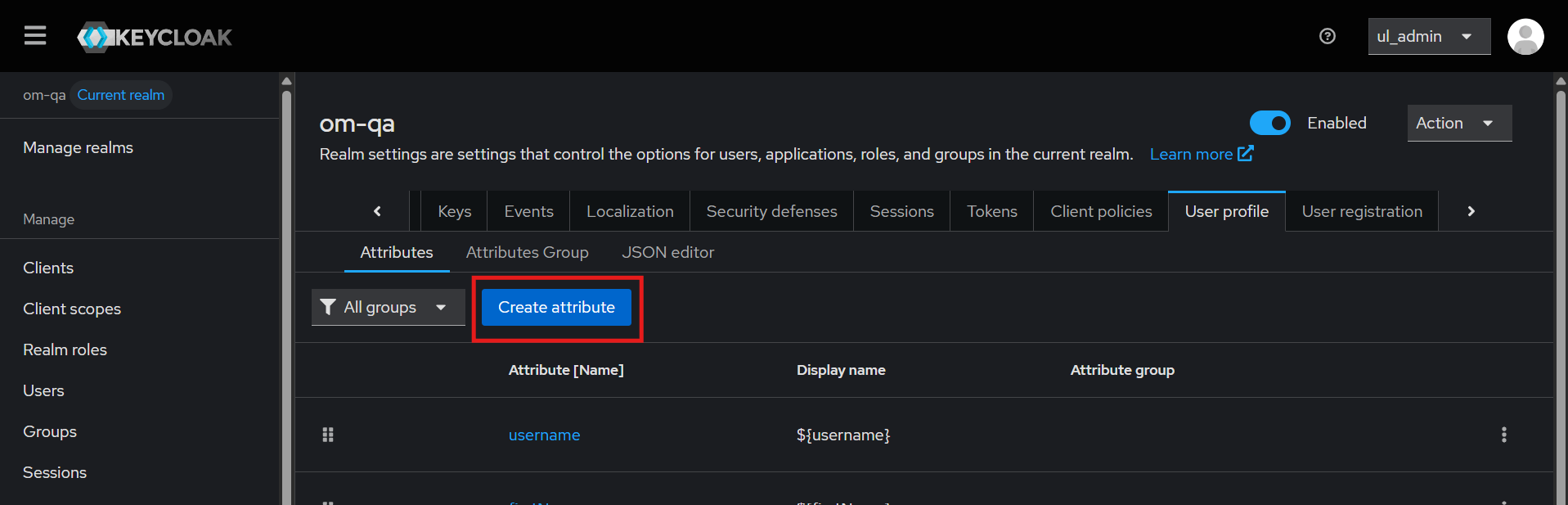
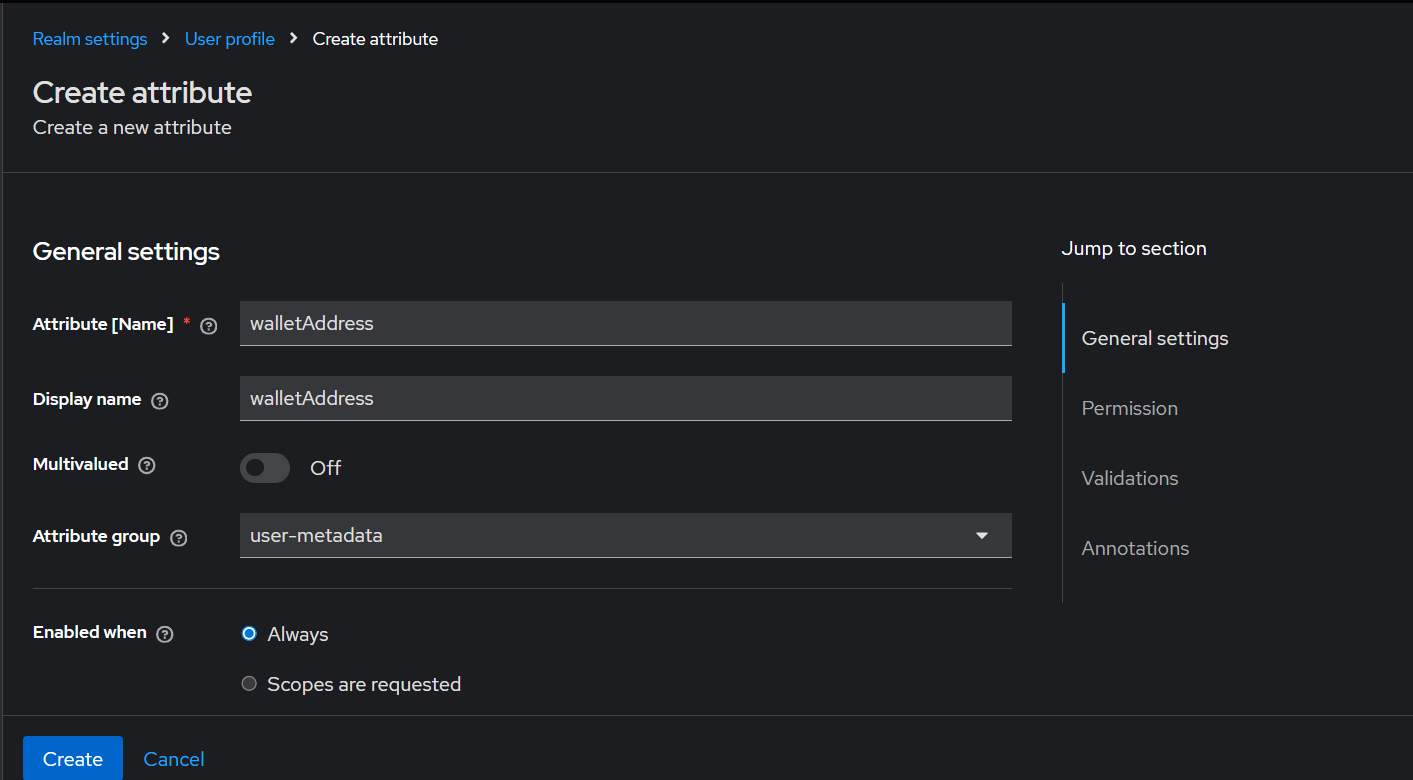
-
Create the attribute as per below:
- Attribute Name:
walletAddress - Display Name:
walletAddress - Multivalued:
Off - Attribute Group (select from drop down):
user-metadata - Enabled when:
Always - Required field:
Off
- Attribute Name:
-
Permissions:
- Who can edit?
UserandAdmin - Who can view?
UserandAdmin
- Who can edit?
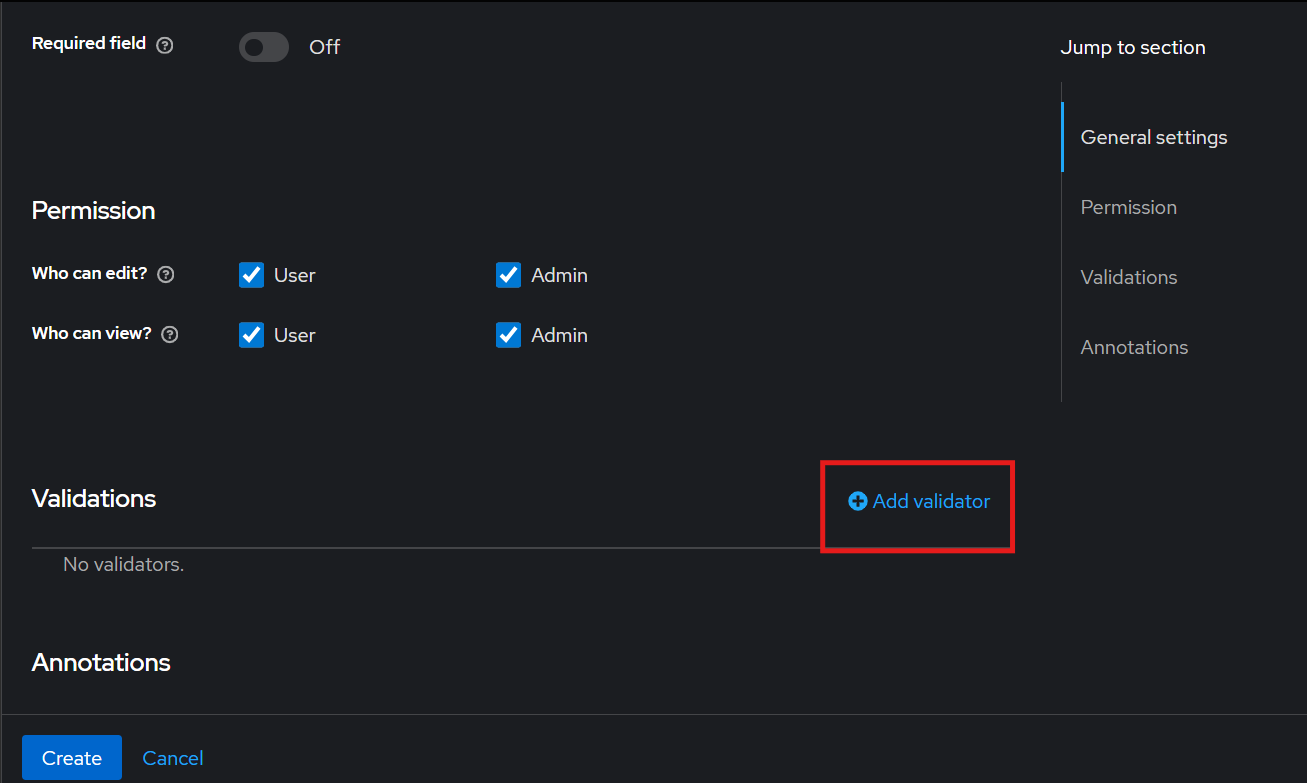
-
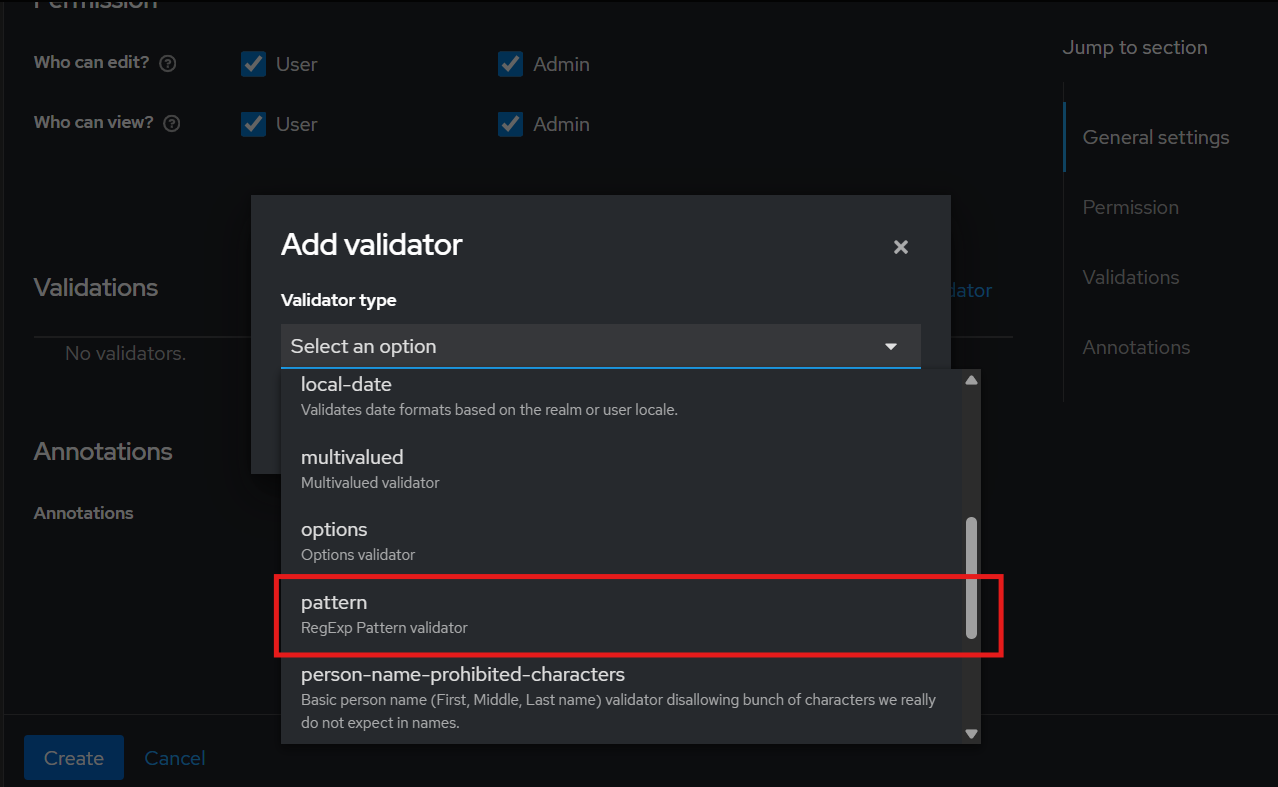
Click on "Add validator", under "Validator Type" select option "pattern".
-
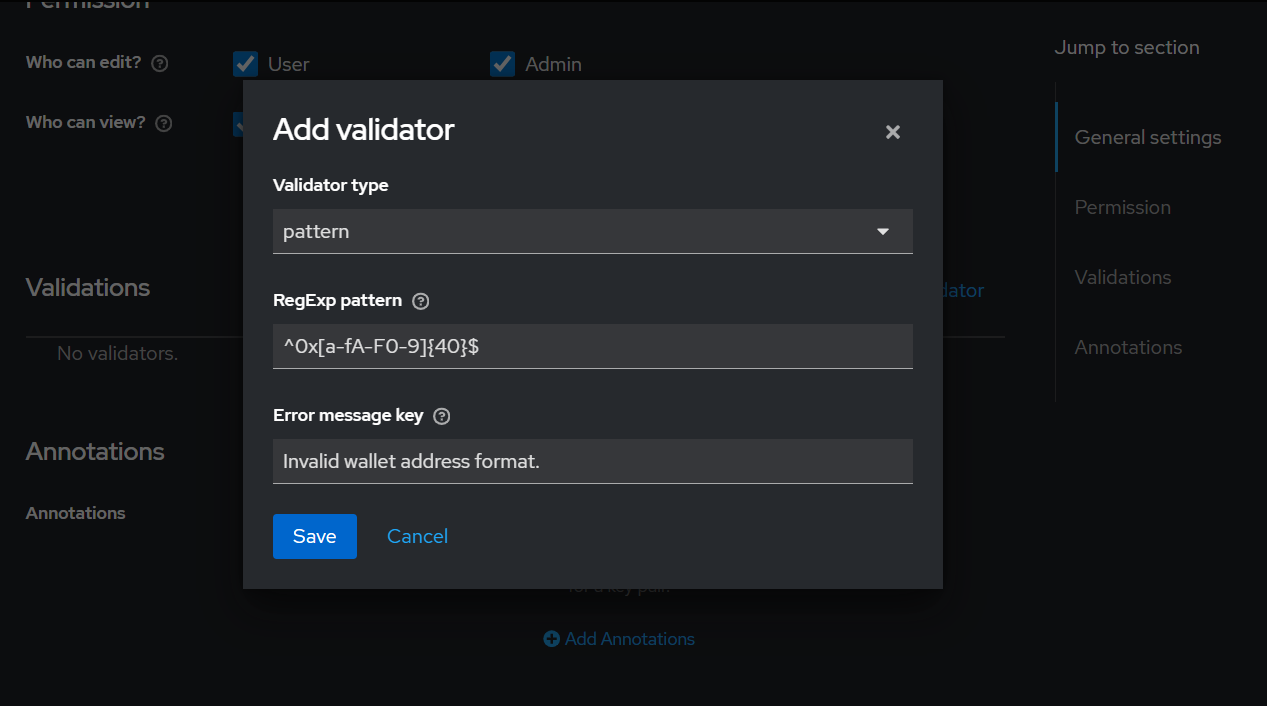
Patterns:
- RegExp Pattern:
^0x[a-fA-F0-9]{40}$ - Error Message key:
Invalid wallet address format.
- RegExp Pattern:
- Exit saving all changes
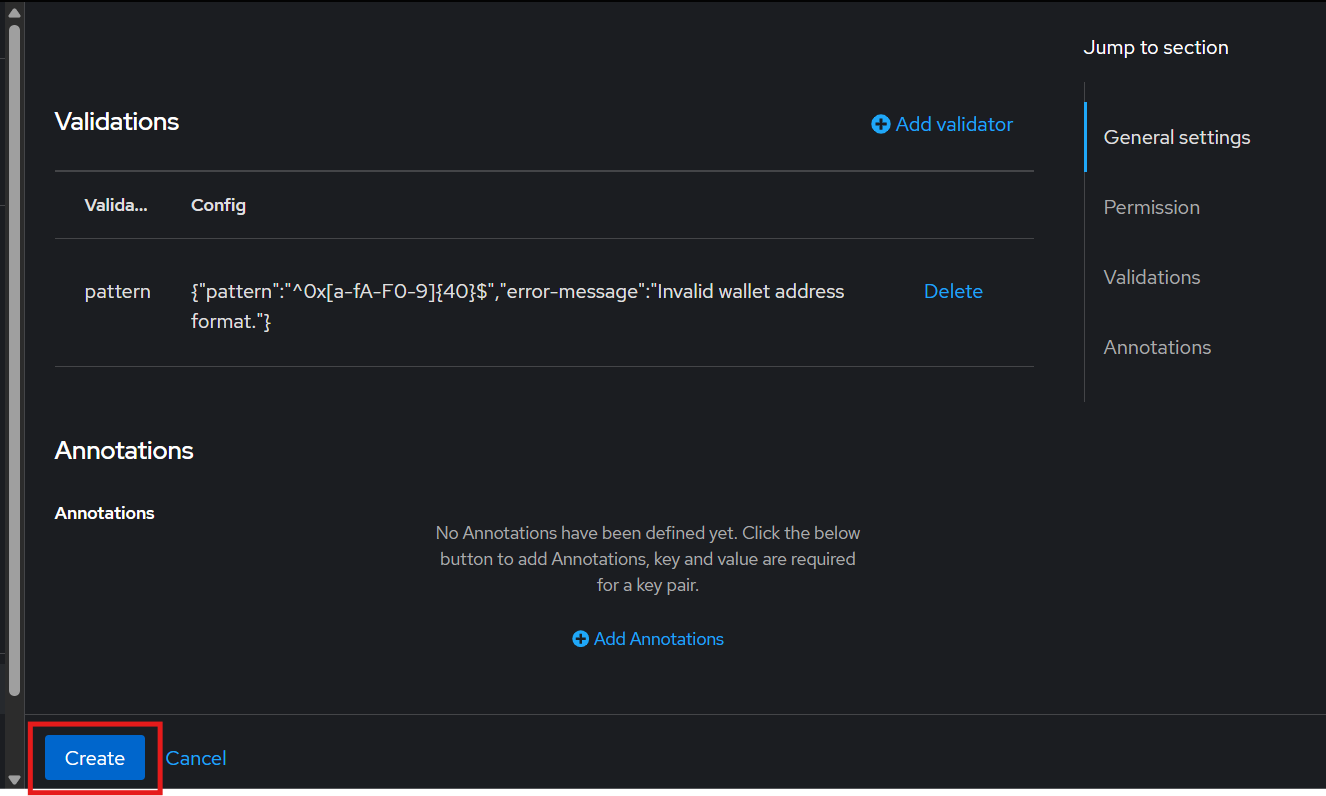
Steps to make email, firstName and lastName at optional field
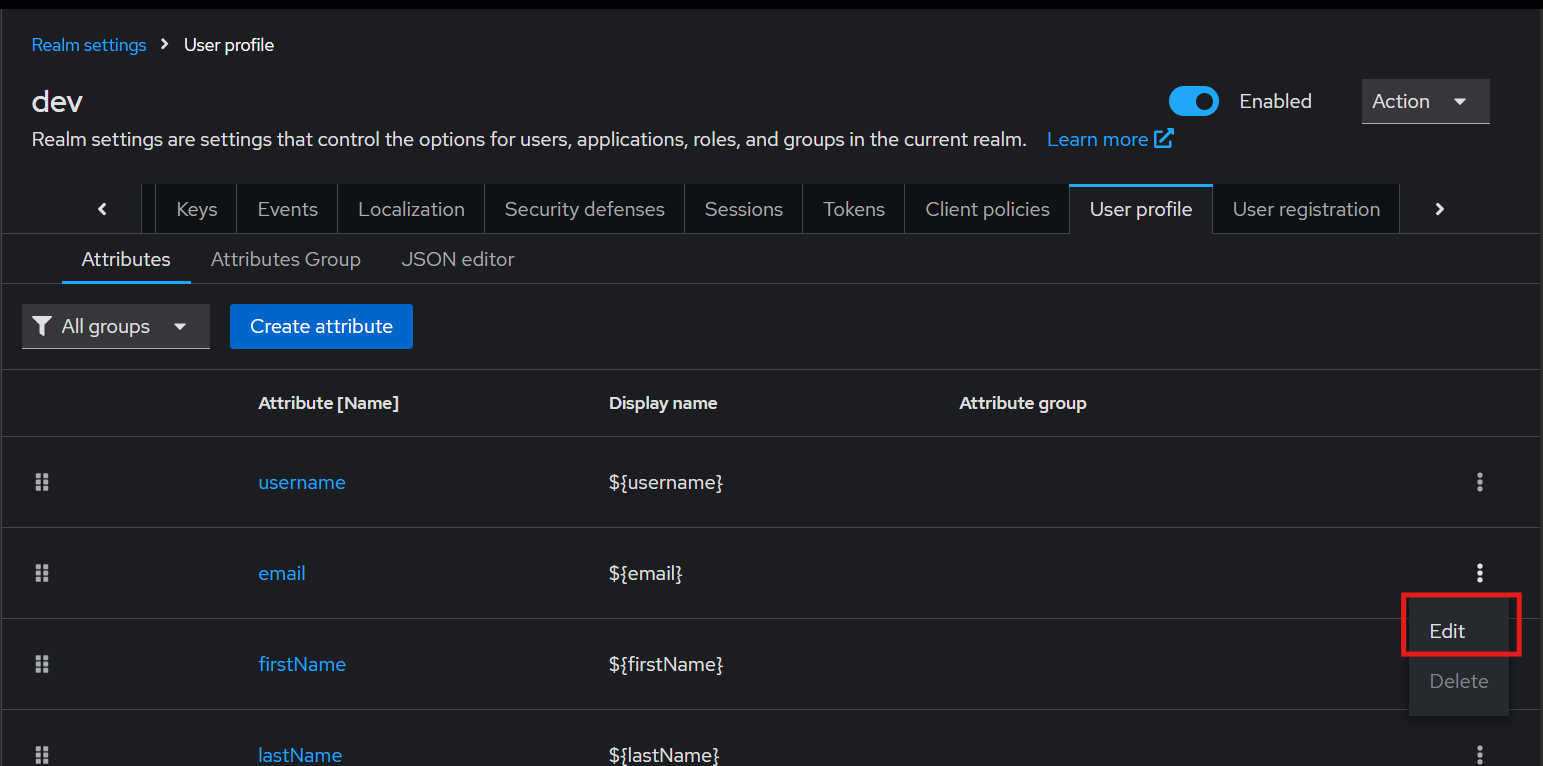
- Navigate to "User profile" under "Realm Settings"
- Click to Edit "email" attribute
- Make the Required field as
OFFand save the changes
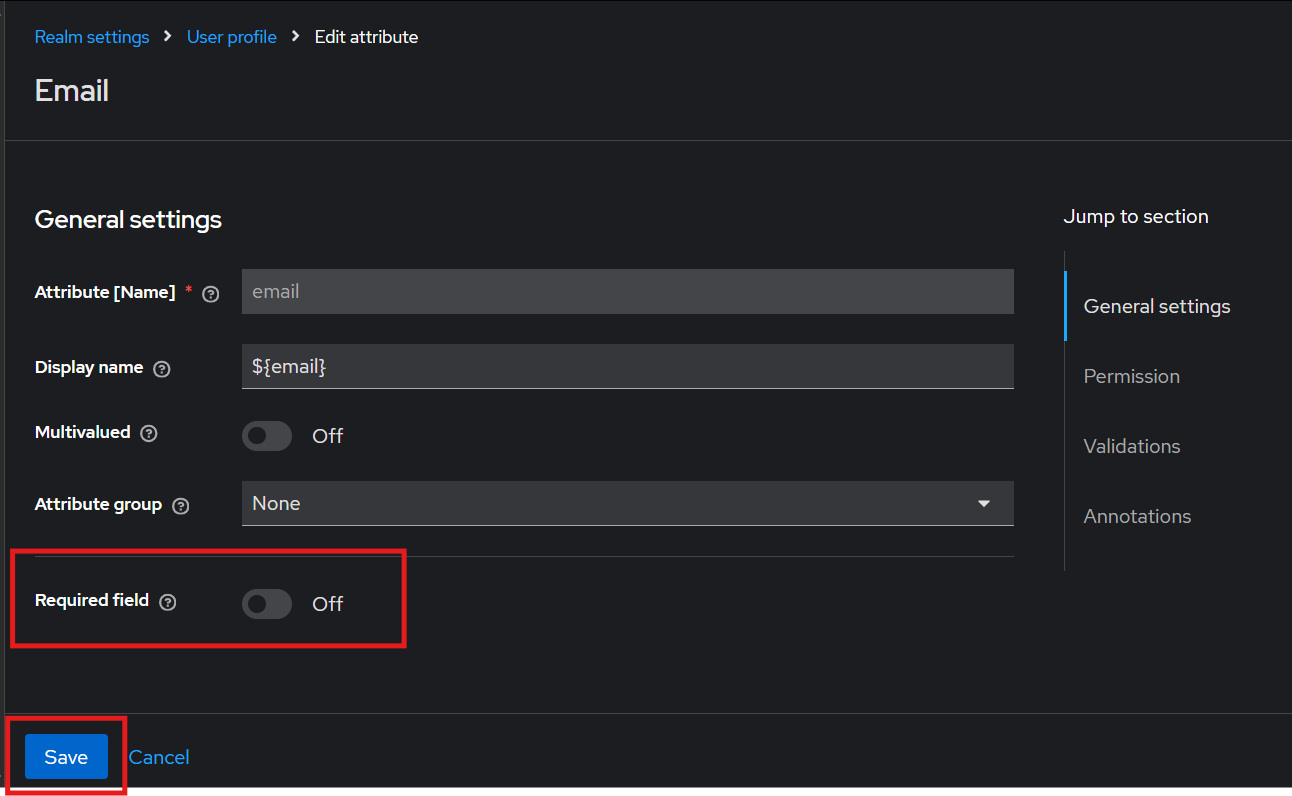
- Repeat steps for
firstNameandlastNameattribute
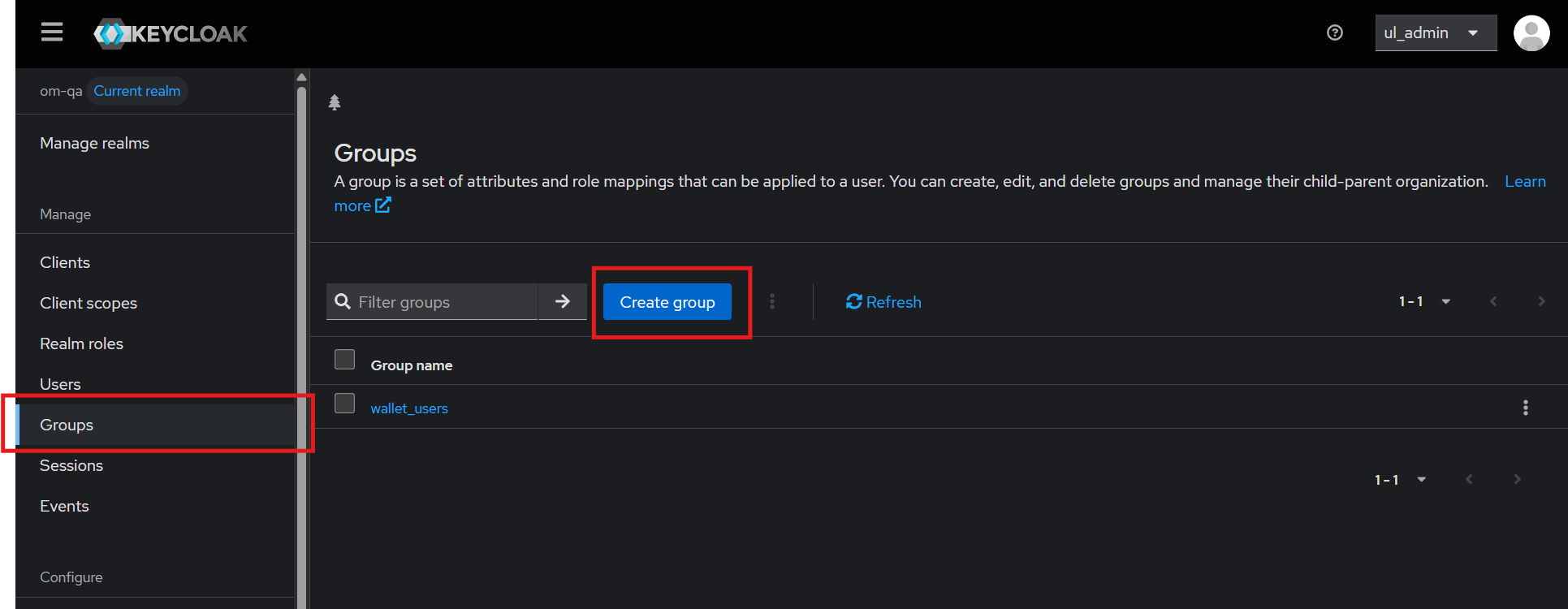
Steps to create a group "wallet_users"
- Navigate to "Groups" under "Manage" and Click on "Create Group" button
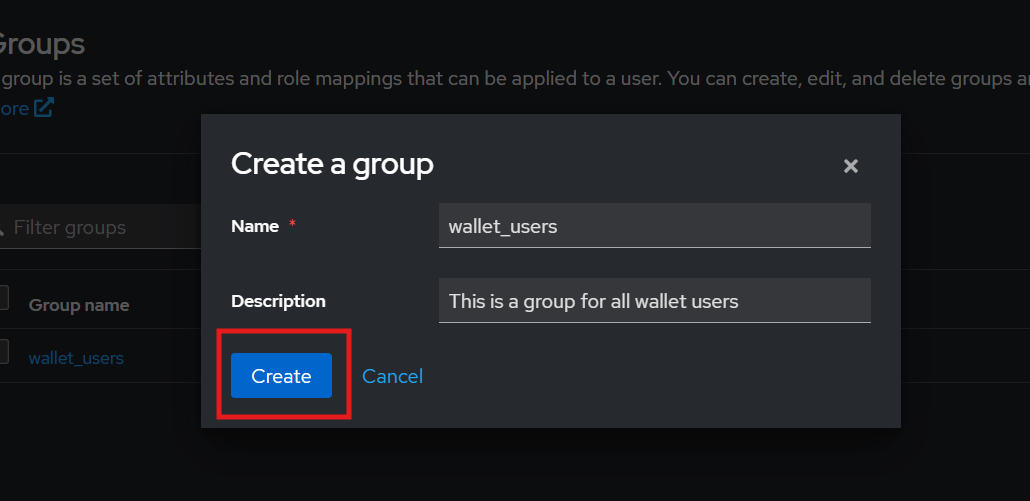
-
Create a group with name "wallet_users":
- Name:
wallet_users - Description:
This is a group for all wallet users
- Name:
-
Save changes
Container images and configmaps
All provided images, available in the Image List section should be downloaded and built to be LGPL compliant.
All new images tags will be used to update Kubernetes manifests.
Auth microservice
ConfigMap
Initial setup
Pre-requisites
Before updating the this Auth service, please update the Keycloak Configuration for Wallet Auth 2.0
Create a set of private and public key per PREAUTH_TOKEN_PRIVATE_KEY , CUSTOMER_TOKEN_PRIVATE_KEY and PREAUTH_TOKEN_PUBLIC_KEY , CUSTOMER_TOKEN_PUBLIC_KEY group.
| Variable | Description |
|---|---|
PREAUTH_TOKEN_PRIVATE_KEY |
Private key used for Pre-Auth |
PREAUTH_TOKEN_PUBLIC_KEY |
Public key used for for Pre-Auth. |
CUSTOMER_TOKEN_PRIVATE_KEY |
Private key used for Pre-Auth |
CUSTOMER_TOKEN_PUBLIC_KEY |
Public key used for for Pre-Auth. |
M2M_PRIVATE_KEY |
Private key used for signing M2M JWT tokens. (Replace with new Key) |
M2M_PUBLIC_KEY |
Public key used for verifying M2M JWT tokens. (Replace with new Key) |
Execute the following command and take note of the value:
Private and pub keys
The output will render both private an public to the stdout.
You should select each block and fill in the correct variable with the respective content.
Execute the above command twice, the rendered contents will be respective used between PREAUTH_TOKEN_PRIVATE_KEY , CUSTOMER_TOKEN_PRIVATE_KEY and PREAUTH_TOKEN_PUBLIC_KEY , CUSTOMER_TOKEN_PUBLIC_KEY group.
Add/replace the following values in Auth microservice's ConfigMap:
Multiline
PREAUTH_TOKEN_PRIVATE_KEY and PREAUTH_TOKEN_PUBLIC_KEY group keys can be added as YAML multiline using |.
Check the indentation to avoid any errors
  CUSTOMER_TOKEN_EXPIRY: '24h'

  PREAUTH_TOKEN_EXPIRY: '5m'
  PREAUTH_RATE_LIMIT_TTL: '300'
  PREAUTH_RATE_LIMIT_COUNT: '5'

  CHALLENGE_TTL_SECONDS: '300'
  EIP712_DOMAIN: 'USBC App'
  EIP712_ACTION: 'Login to USBC'

  #Twilio
  TWILIO_ACCOUNT_SID: '[Replace with Twilio Account SID]'
  TWILIO_AUTH_TOKEN: '[Replace with Twilio Auth Token]'
  TWILIO_PHONE_NUMBER: '[Replace with twilio Phone Number]'
  OTP_PLATFORM: 'OMNUMI'


  #PreAuth token
  PREAUTH_TOKEN_PRIVATE_KEY: |
    '[with key contents]'

  PREAUTH_TOKEN_PUBLIC_KEY: |
    '[with key contents]'

  CUSTOMER_TOKEN_PRIVATE_KEY: |
    '[with key contents]'

  CUSTOMER_TOKEN_PUBLIC_KEY: |
    '[with key contents]'

  M2M_PRIVATE_KEY: |
    '[This key was alredy added , need to replace this new value]'

  M2M_PUBLIC_KEY: |
    '[This key was alredy added , need to replace this new value]'
Chain-Core microservice
ConfigMap
Add/replace the following values in Chain Core microservice's ConfigMap:
Frontend microservice
ConfigMap
Add/replace the following values in Frontned ConfigMap:
  FLUTTER_CONFIG_AZURE_HOST_URL: '<baseUrl>/v2/private/core'
  FLUTTER_CONFIG_AZURE_HOST_URL_V2: '<baseUrl>/v2/private/rule-engine'
  FLUTTER_CONFIG_HOST_URL: '<baseUrl>/v2/private/core'
  FLUTTER_CONFIG_REPO_HOST_URL: '<baseUrl>/v2/private/report'
  FLUTTER_CONFIG_AUTH_HOST_URL: '<baseUrl>/v2/private/auth'
  FLUTTER_CONFIG_CARD_ISSUE_URL: '<baseUrl>/v2/private/card-issuer'
Card Issuer microservice
Card Issuer microservice
With this release a new service it's been deployed and must be configured.
Kubernetes
Review
The following files are meant to be edited and adapted accordingly to your Kubernetes environment.
Namespace
Deployment
apiVersion: apps/v1
kind: Deployment
metadata:
  name: card-issuer-service
spec:
  replicas: 3
  selector:
    matchLabels:
      app: card-issuer-service
  template:
    metadata:
      labels:
        app: card-issuer-service
    spec:
      containers:
      - name: card-issuer-service
        image: omnumi.azurecr.io/omnumi-card-issuer-service:latest
        imagePullPolicy: Always
        ports:
        - containerPort: 3005
        envFrom:
        - configMapRef:
            name: card-issuer-service-configmap
Service
apiVersion: v1
kind: Service
metadata:
  name: card-issuer-service
spec:
  type: ClusterIP
  ports:
  - port: 3005
  selector:
    app: card-issuer-service
Configmap
Multiline
Check the indentation to avoid any errors
apiVersion: v1
kind: ConfigMap
metadata:
  name: card-issuer-service-configmap
data:
  # Database Configuration
  DB_HOST: '[replace with database host]'
  DB_NAME: '[replace with database name]'
  DB_PWD: '[replace with database password]'
  DB_USER: '[replace with database user]'

  # Viacarte API Configuration
  VIA_CARTE_X_API_KEY: '[replace with Viacarte API key]'
  VIA_CARTE_API_BASE_URL: '[replace with Viacarte API base URL]/api'
  VIA_CARTE_API_VERSION: 'v1'
  VENDOR_VIACARTE: 'VIACARTE'
  ENTITY_ID: '[replace with Viacarte entity ID]'

  # Kafka Configuration
  KAFKA_CLIENT_ID: 'CUSTOM_CONTRACT_EVENTS'
  KAFKA_BROKER: '[replace with Kafka host]'
  KAFKA_PORT: '[replace with Kafka port]'
  KAFKA_LOGGER_EVENT_TOPIC: 'KAFKA_LOGGER_EVENT_TOPIC'

  # Auth / Rule Engine Service URLs
  AUTH_SERVICE_BASE_URL: '[replace with auth service base URL]'
  RULE_ENGINE_URL: '[replace with rule engine base URL]'

  # Default Tenant
  DEFAULT_TENANT: 'Platform Operator'

  # Azure Configuration
  AZURE_CLIENT_ID: '[replace with Azure client ID]'
  AZURE_CLIENT_SECRET: '[replace with Azure client secret]'
  AZURE_KEYVAULT_NAME: '[replace with Azure Key Vault name]'
  AZURE_TENANT_ID: '[replace with Azure tenant ID]'
Tx-Signer microservice
Tx-Signer microservice
With this release a new service it's been deployed and must be configured.
Pre-requisites
Update Genesis keys
-
Store MNEMONIC in Azure keyvault
Key: MNEMONIC
Value: ' update the MNEMONIC value in single quote (')'
-
Store the Public and Private key of the zeroth index of the Genisis wallet in Azure keyvault
Key: Public key
Value: Privatekey
Kubernetes
Review
The following files are meant to be edited and adapted accordingly to your Kubernetes environment.
Namespace
Deployment
apiVersion: apps/v1
kind: Deployment
metadata:
  name: tx-signer
spec:
  replicas: 3
  selector:
    matchLabels:
      app: tx-signer
  template:
    metadata:
      labels:
        app: tx-signer
    spec:
      containers:
      - name: tx-signer
        image: omnumi.azurecr.io/omnumi-tx-signer:latest
        imagePullPolicy: Always
        ports:
        - containerPort: 3004
        envFrom:
        - configMapRef:
            name: tx-signer-configmap
Service
apiVersion: v1
kind: Service
metadata:
  name: tx-signer
spec:
  type: ClusterIP
  ports:
  - port: 3004
  selector:
    app: tx-signer
Configmap
apiVersion: v1
kind: ConfigMap
metadata:
  name: tx-signer-configmap
data:
  # Database Configuration
  DB_HOST: '[replace with database host]'
  DB_NAME: '[replace with database name]'
  DB_PWD: '[replace with database password]'
  DB_USER: '[replace with database user]'

  # Azure Credentials
  AZURE_TENANT_ID: '[replace with azure tenant id]'
  AZURE_CLIENT_ID: '[replace with azure client id]'
  AZURE_CLIENT_SECRET: '[replace with azure client secret]'
  AZURE_KEYVAULT_NAME: '[replace with azure keyvault name]'

  # Blockchain Configuration
  SANDBOX_RPC_URL: '[replace with RPC URL]'
  MNEMONIC: 'MNEMONIC'

  # Kafka Configuration
  KAFKA_BROKER: '[replace with kafka host]'
  KAFKA_PORT: '[replace with kafka port]'
  KAFKA_LOGGER_EVENT_TOPIC: 'KAFKA_LOGGER_EVENT_TOPIC'
  TOKEN_RESERVE: 'TOKENRESERVE'
Card Reservation microservice
Card Reservation microservice
With this release a new service it's been deployed and must be configured.
Kubernetes
Review
The following files are meant to be edited and adapted accordingly to your Kubernetes environment.
Namespace
Deployment
apiVersion: apps/v1
kind: Deployment
metadata:
  name: card-reservation
spec:
  replicas: 3
  selector:
    matchLabels:
      app: card-reservation
  template:
    metadata:
      labels:
        app: card-reservation
    spec:
      containers:
      - name: card-reservation
        image: omnumi.azurecr.io/omnumi-card-reservation:latest
        imagePullPolicy: Always
        ports:
        - containerPort: 3008
        envFrom:
        - configMapRef:
            name: card-reservation-configmap
Service
apiVersion: v1
kind: Service
metadata:
  name: card-reservation
spec:
  type: ClusterIP
  ports:
  - port: 3008
  selector:
    app: card-reservation
Configmap
apiVersion: v1
kind: ConfigMap
metadata:
  name: card-reservation-configmap
data:
  # Database Configuration
  DB_HOST: '[replace with database host]'
  DB_NAME: '[replace with database name]'
  DB_PWD: '[replace with database password]'
  DB_USER: '[replace with database user]'

  # Azure Credentials
  AZURE_TENANT_ID: '[replace with azure tenant id]'
  AZURE_CLIENT_ID: '[replace with azure client id]'
  AZURE_CLIENT_SECRET: '[replace with azure client secret]'
  AZURE_KEYVAULT_NAME: '[replace with azure keyvault name]'
  AZURE_SECRET_NAME: 'PSQLENCRYPTIONKEY'

  # Blockchain URLs
  SANDBOX_RPC_URL: '[replace with  RPC URL]'
  SANDBOX_WSS_URL: '[replace with  WSS URL]'
  WEB3_SIGNER_URL: '[replace with  tx-signer URL]'

  # Kafka Configuration
  KAFKA_BROKER: '[replace with kafka host]'
  KAFKA_PORT: '[replace with kafka port]'
  SCHEMA_REGISTRY_URL: '[replace with kafka schema registry URL]'
  KAFKA_EVENT_DEBIT_GROUP_ID: 'debitCardTx'
  KAFKA_EVENT_DEBIT_TOPIC: 'debitCardTx'
  KAFKA_DLQ_TOPIC: 'DEBITDLQTX'
  KAFKA_LOGGER_EVENT_TOPIC: 'KAFKA_LOGGER_EVENT_TOPIC'
  KAFKA_EVENT_SETTLEMENT_TOPIC: 'cardSettlement'
  KAFKA_EVENT_SETTLEMENT_GROUP_ID: 'cardSettlement'

  # Redis Configuration
  REDIS_PORT: '[replace with redis port]'
  REDIS_HOST: '[replace with redis host]'
  REDIS_PASSWORD: '[replace with redis password]'
  REDIS_SERVICE: 'card-reservation'
  REDIS_LOCK_QUEUE: 'card_reservation_queue_lock'

  # Smart Contract Config
  TOKEN_RESERVE: 'TOKENRESERVE'
  TOKEN_RESERVE_EVENT: 'AUTH'
  TOKEN_REVERSAL_EVENT: 'REVERSAL'
  MIN_CONFIRMATIONS: '3'
Client Authorizer microservice
Client Authorizer microservice
With this release a new service it's been deployed and must be configured.
Kubernetes
Review
The following files are meant to be edited and adapted accordingly to your Kubernetes environment.
Namespace
Deployment
apiVersion: apps/v1
kind: Deployment
metadata:
  name: client-authorizer
spec:
  replicas: 1
  selector:
    matchLabels:
      app: client-authorizer
  template:
    metadata:
      labels:
        app: client-authorizer
    spec:
      containers:
      - name: client-authorizer
        image: omnumi.azurecr.io/omnumi-client-authorizer:latest
        imagePullPolicy: Always
        ports:
          - name: socket
            containerPort: 8583
          - name: api
            containerPort: 7081
        envFrom:
        - configMapRef:
            name: client-authorizer-configmap
Service
---
apiVersion: v1
kind: Service
metadata:
  name: client-authorizer-socket
  annotations:
    <any if needed>
spec:
  type: LoadBalancer
  selector:
    app: client-authorizer
  ports:
    - name: socket
      port: 8583
      targetPort: 8583
      protocol: TCP
---
apiVersion: v1
kind: Service
metadata:
  name: client-authorizer-api
spec:
  type: ClusterIP
  selector:
    app: client-authorizer
  ports:
    - name: api
      port: 80
      targetPort: 7081
Configmap
New Database Schema Required
This service depends on the new database schema named client_authorizer. Please ensure it is applied before deploying the service.
apiVersion: v1
kind: ConfigMap
metadata:
  name: client-authorizer-configmap
data:
  DOMAIN_DEBIT_CARD_TXN_TOPIC_NAME: debitCardTx
  PLATFORM_CARD_ISSUER_SERVICE_URL: '[replace with card issuer service URL]'
  PLATFORM_KAFKA_BROKER: '[replace with kafka broker address]'
  PLATFORM_KAFKA_PRODUCER_ACKS: all
  PLATFORM_KAFKA_PRODUCER_RETRIES: "3"
  PLATFORM_KAFKA_PRODUCER_RETRY_BACKOFF_MS: "1000"
  PLATFORM_KAFKA_PRODUCER_SOCKET_TIMEOUT_MS: "10000"
  PLATFORM_KAFKA_SCHEMA_REGISTRY_TIMEOUT: "5000"
  PLATFORM_KAFKA_SCHEMA_REGISTRY_URL: '[replace with schema registry URL]'

  PLATFORM_REDIS_ADDRESS: '[replace with redis address]'
  PLATFORM_REDIS_DB: "0"
  PLATFORM_REDIS_FAIL_OVER_CLUSTER: "false"
  PLATFORM_REDIS_MASTER_NAME: ""
  PLATFORM_REDIS_PASSWORD: '[replace with redis password]'

  PLATFORM_RULE_ENGINE_SERVICE_URL: '[replace with rule engine service URL]'
  PLATFORM_SOCKET_ADDRESS: "8583"

  PLATFORM_DATABASE_HOST: '[replace with database host]'
  PLATFORM_DATABASE_PORT: '[replace with database port]'
  PLATFORM_DATABASE_USERNAME: '[replace with database username]'
  PLATFORM_DATABASE_PASSWORD: '[replace with database password]'
  PLATFORM_DATABASE_DB: '[replace with database name]'
  PLATFORM_DATABASE_SCHEMA: 'client_authorizer'
  PLATFORM_DATABASE_SSLMODE: 'disable'
  PLATFORM_DATABASE_MAX_IDLE_CONNS: '10'
  PLATFORM_DATABASE_MAX_OPEN_CONNS: '100'
  PLATFORM_DATABASE_CONN_MAX_LIFE: '1800'
  PLATFORM_DATABASE_CONN_MAX_IDLE: '900'

  PLATFORM_LOCK_TIMEOUT: '5'
  PLATFORM_WEB_SERVER_PORT: '7081'
Card Settelement microservice
Card Settelement microservice
With this release a new service it's been deployed and must be configured.
Kubernetes
Review
The following files are meant to be edited and adapted accordingly to your Kubernetes environment.
Namespace
Deployment
apiVersion: apps/v1
kind: Deployment
metadata:
  name: card-settlement
spec:
  replicas: 3
  selector:
    matchLabels:
      app: card-settlement
  template:
    metadata:
      labels:
        app: card-settlement
    spec:
      containers:
      - name: card-settlement
        image: omnumi.azurecr.io/omnumi-card-settlement:latest
        imagePullPolicy: Always
        ports:
        - containerPort: 3007
        envFrom:
        - configMapRef:
            name: card-settlement-configmap
Service
apiVersion: v1
kind: Service
metadata:
  name: card-settlement
spec:
  type: ClusterIP
  ports:
  - port: 3007
  selector:
    app: card-settlement
Configmap
New Database Schema Required
This service depends on the new database schema named settlement_service. Please ensure it is applied before deploying the service.
apiVersion: v1
kind: ConfigMap
metadata:
  name: card-settlement-configmap
data:
  # Database Configuration
  DB_HOST: '[replace with database host]'
  DB_USER: '[replace with database user]'
  DB_PWD: '[replace with database password]'
  DB_NAME: '[replace with database name]'
  DB_SCHEMA: 'settlement_service'

  # Kafka Configuration
  KAFKA_BROKER: '[replace with kafka host]'
  KAFKA_PORT: '[replace with kafka host port]'
  KAFKA_SCHEMA_REGISTRY_URL: '[replace with kafka schema registry url]'
  KAFKA_LOGGER_EVENT_TOPIC: 'KAFKA_LOGGER_EVENT_TOPIC'
  KAFKA_CARD_SETTLEMENT_TOPIC_NAME: 'cardSettlement'
  KAFKA_CLIENT_ID: 'KAFKA_LOGGER_EVENT'

  # External API Configuration
  CARD_RESERVATION_SERVICE_BASE_URL: '[replace with card reservation service URL]'
  TRANSACTION_SIGNER_SERVICE_BASE_URL: '[replace with transaction signer service URL]'

  # Azure Storage Configuration
  AZURE_STORAGE_CONNECTION_STRING: '[replace with Azure storage connection string]'
  RECONCILIATION_CONTAINER: 'reconciliation' ['This is a new container that needs to be created.']
  CONFIRMATION_CONTAINER: 'confirmation' ['This is a new container that needs to be created.']

  # Blockchain Configuration
  SANDBOX_RPC_URL: '[replace with RPC URL]'
  WEB3_SIGNER_URL: '[replace with web3 signer URL]'
  TOKEN_RESERVE: 'TOKENRESERVE'
  USBC: 'USBC'
  MIN_CONFIRMATIONS: '3'
  SETTLEMENT_TOPIC: 'cardSettlement'

  # SFTP Configuration
  SFTP_URL: '[replace with SFTP username or URL]'
  SFTP_PASSWORD: '[replace with SFTP password]'
  SFTP_PORT: '22'

  SFTP_CONFIRMATION_OUTGOING_PATH: 'downloads/recon_result/OUTGOING'
  SFTP_CONFIRMATION_ARCHIVE_PATH: 'downloads/recon_result/ARCHIVE'
  SFTP_RECONCILIATION_ARCHIVE_PATH: 'uploads/recon/ARCHIVE'
  SFTP_RECONCILIATION_INCOMING_PATH: 'uploads/recon/INCOMING'
  SFTP_RECONCILIATION_INBOX_PATH: 'uploads/recon/INBOX'
  SFTP_RECONCILIATION_FAILED_PATH: 'uploads/recon/FAILED'

  SFTP_MAX_RETRIES: '5'
  SFTP_RETRY_DELAY_MS: '300000'
Swagger APIs
Download Swagger APIs tarball file available in Assets, unpack/unzip it in order to perform remaining instructions.
Update API
Public
Here’s the updated doc for Public API (v2), written as new API creation with API URL suffix included:
Public (v2)
Upload file
- Navigate to the API Management service service.
- Expand
APIsleft blade menu and selectAdd API. -
Choose OpenAPI tile
-
Import method: Create new
- Select file:
Public.openapi+json.json
Update settings
- Select
PublicAPI. -
Open
Settingstab and update: -
Web service URL =
coremicroservice URL - API URL suffix =
v2 - Save the changes.
Update methods ChainCore
- Open
Designtab and enable Group by tag. - Expand ChainCore and update the Backend – HTTP(s) endpoint with
chain-coremicroservice URL. - Repeat operation for all listed API methods under ChainCore.
Update methods Auth
- Open
Designtab and enable Group by tag. - Expand Auth and update the Backend – HTTP(s) endpoint with
auth servicemicroservice URL. - Repeat operation for all listed API methods under Auth.
Update methods Card Issuer
- Open
Designtab and enable Group by tag. - Expand Card and update the Backend – HTTP(s) endpoint with
card issuer servicemicroservice URL. - Repeat operation for all listed API methods under Card.
Partner (v2)
Upload file
- Navigate to the API Management service service.
- Expand
APIsleft blade menu and selectAdd API. -
Choose OpenAPI tile
-
Import method: Create new
- Select file:
Partner.openapi+json.json
Update settings
- Select
PartnerAPI. -
Open
Settingstab and update: -
Web service URL =
coremicroservice URL - API URL suffix =
v2/partner - Save the changes.
Update methods ChainCore
- Open
Designtab and enable Group by tag. - Expand ChainCore and update the Backend – HTTP(s) endpoint with
chain-coremicroservice URL. - Repeat operation for all listed API methods under ChainCore.
Update methods Card Issuer
- Open
Designtab and enable Group by tag. - Expand Card and update the Backend – HTTP(s) endpoint with
card issuer servicemicroservice URL. - Repeat operation for all listed API methods under Card.
Private: Omnumi Core
Upload file
- Navigate to the API Management service service.
- Expand
APIsleft blade menu and selectAdd API. -
Choose OpenAPI tile
-
Import method: Create new
- Select file:
Private_Core.openapi+json.json
Update settings
- Select
Omnumi CoreAPI. -
Open
Settingstab and update: -
Web service URL =
coremicroservice URL - API URL suffix =
v2/private/core - Save the changes.
Private: Omnumi Auth Service
Upload file
- Navigate to the API Management service service.
- Expand
APIsleft blade menu and selectAdd API. -
Choose OpenAPI tile
-
Import method: Create new
- Select file:
Private_Auth_Service.openapi+json.json
Update settings
- Select
Omnumi Auth ServiceAPI. -
Open
Settingstab and update: -
Web service URL =
auth-servicemicroservice URL - API URL suffix =
v2/private/auth - Save the changes.
Private: Omnumi Rule Engine
Upload file
- Navigate to the API Management service service.
- Expand
APIsleft blade menu and selectAdd API. -
Choose OpenAPI tile
-
Import method: Create new
- Select file:
Private_Rule_engine.openapi+json.json
Update settings
- Select
Omnumi Rule EngineAPI. -
Open
Settingstab and update: -
Web service URL =
rule-enginemicroservice URL - API URL suffix =
v2/private/rule-engine - Save the changes.
Private: Reports
Upload file
- Navigate to the API Management service service.
- Expand
APIsleft blade menu and selectAdd API. -
Choose OpenAPI tile
-
Import method: Create new
- Select file:
Private_Reports.openapi+json.json
Update settings
- Select
Omnumi ReportsAPI. -
Open
Settingstab and update: -
Web service URL =
reportsmicroservice URL - API URL suffix =
v2/private/reports - Save the changes.
Private: Card Settlement
Upload file
- Navigate to the API Management service service.
- Expand
APIsleft blade menu and selectAdd API. -
Choose OpenAPI tile
-
Import method: Create new
- Select file:
Private_Settelement.openapi+json.json
Update settings
- Select
Omnumi Card SettlementAPI. -
Open
Settingstab and update: -
Web service URL =
card-settlementmicroservice URL - API URL suffix =
v2/private/card-settlement - Save the changes.
Private: Card Issuer
Upload file
- Navigate to the API Management service service.
- Expand
APIsleft blade menu and selectAdd API. -
Choose OpenAPI tile
-
Import method: Create new
- Select file:
Omnumi Card Issuer.openapi+json.json
Update settings
- Select
Omnumi Card IssuerAPI. -
Open
Settingstab and update: -
Web service URL =
card-issuermicroservice URL - API URL suffix =
v2/private/card-issuer - Save the changes.
Azure Functions - Scheduler
Identify the Scheduler Azure Function app name and resource group, take note of them and replace the placeholders.
Download Azure App Function - Scheduler ZIP file available in Assets, unpack/unzip it in order to perform remaining instructions.
File: azapp_scheduler_280.zip
Deploy and build
Deploy the Function Using VS Code
- In VS Code, open the Azure panel (click the Azure logo in the sidebar).
- Under Functions, sign in to your Azure account if not already.
- Find your subscription and locate your Function App.
- Right-click the Function App name and select:
Deploy to Function App... - Choose the folder to deploy (
ul-scheduler). - Confirm "Yes" when prompted about overwriting existing content.
☁️ This will package and deploy your function to Azure.
Verify Deployment
- Go to the Azure Portal.
- Navigate to your Function App.
- Check if the deployed function appears under the Functions section.
Update environment variables
After a successful deployment, must update the following environment variables:
| Environment variable | Description | Default |
|---|---|---|
SETTLEMENT_SERVICE_REQUEST_METHOD |
API Request method | POST |
SETTLEMENT_SERVICE_URL |
Settelement Service URL | [Replace with settelment service url from api portal <baseURL>/v2/private/card-settelement/settlement/process-files] |
Azure Functions
For the SETTLEMENT_SERVICE_URL variable, the value name is collected from the resource created before.
$ az functionapp config appsettings set \
    --settings SETTLEMENT_SERVICE_URL="<baseURL>/v2/private/card-settelement/settlement/process-files" SETTLEMENT_SERVICE_REQUEST_METHOD="POST" \
    --resource-group [resource-group name] \
    --name [azure-function name]
Image list
| Microservice name | Image tag |
|---|---|
| Core Microservice | omnumisandbox.azurecr.io/core:2.8.0-deliverable |
| Chain-core Microservice | omnumisandbox.azurecr.io/chain-core:2.8.0-deliverable |
| Reports Microservice | omnumisandbox.azurecr.io/report:2.8.0-deliverable |
| Rule-Engine Microservice | omnumisandbox.azurecr.io/rule-engine:2.8.0-deliverable |
| Frontend Microservice | omnumisandbox.azurecr.io/frontend:2.8.0 |
| Auth Microservice | omnumisandbox.azurecr.io/ul-auth:2.8.0-deliverable |
| Card Issuer Microservice | omnumisandbox.azurecr.io/omnumi-card-issuer-service:2.8.0-deliverable |
| Card Reservation Microservice | omnumisandbox.azurecr.io/omnumi-card-reservation:2.8.0-deliverable |
| Card Settelement Microservice | omnumisandbox.azurecr.io/omnumi-card-settlement:2.8.0-deliverable |
| Client Authorizer Microservice | omnumisandbox.azurecr.io/omnumi-client-authorizer:2.8.0 |
| TX Signer Microservice | omnumisandbox.azurecr.io/omnumi-tx-signer:2.8.0-deliverable |
post-release-scripts
Download Post Release Script file available in Assets, with (post-release-scripts-280.pdf)